2014/09/17

Introduction to Object Oriented Programming Concepts

Object Oriented Programming(OOP) Features

  • Object oriented programming (OOP) is a programming model where programs are organized around object and data rather than action and logic.
  • OOP allows decomposition of a problem into a number of entities called Object and then builds data and function around these objects.
  • The program is divided into a number of small units called Object. The data and function are build around these objects.
  • The data of the objects can be accessed only by the functions associated with that object.
  • The functions of one object can access the functions of other object.
OOP has the following important features:

Class

A class is the core of any modern Object Oriented Programming language such as C#.
In OOP languages, it is a must to create a class for representing data.
Class is a blueprint of an object that contains variables for storing data and functions to performing operations on these data.
Class will not occupy any memory space and hence it is only a logical representation of data.
To create a class, you simply use the keyword "class" followed by the class name:
class Employee
{

}

Object

Objects are the basic run-time entities in an object oriented system. They may represent a person, a place or any item that the program has to handle.
"Object is a Software bundle of related variable and methods. "
“Object is an instance of a class.”

Class will not occupy any memory space. Hence to work with the data represented by the class, you must create a variable for the class, which is called as an object.
When an object is created by using the keyword new, then memory will be allocated for the class in heap memory area, which is called as an instance and its starting address will be stored in the object in stack memory area.
When an object is created without the keyword new, then memory will not be allocated in heap, i.e., instance will not be created and object in the stack contains the value null.
When an object contains null, then it is not possible to access the members of the class using that object.
class Employee
{

}
Syntax to create an object of class Employee:

Employee objEmp = new Employee();
All the programming languages supporting object oriented programming will be supporting these three main concepts:
  1. Encapsulation
  2. Inheritance
  3. Polymorphism

Abstraction

Abstraction is "To represent the essential feature without representing the background details."
Abstraction lets you focus on what the object does instead of how it does it.
Abstraction provides you a generalized view of your classes or object by providing relevant information.
Abstraction is the process of hiding the working style of an object, and showing the information of an object in an understandable manner.

Real World Example of Abstraction

Suppose you have an object Mobile Phone.
Suppose you have 3 mobile phones as follows:
  • Nokia 1400 (Features:- Calling, SMS)
  • Nokia 2700 (Features:- Calling, SMS, FM Radio, MP3, Camera)
  • Black Berry (Features:-Calling, SMS, FM Radio, MP3, Camera, Video Recording, Reading E-mails)
Abstract information (Necessary and Common Information) for the object "Mobile Phone" is to make a call to any number and can send SMS." so that, for mobile phone object you will have an abstract class like the following:
    abstract class MobilePhone
    {
        public void Calling();
        public void SendSMS();
    }

    public class Nokia1400 : MobilePhone
    {

    }

    public class Nokia2700 : MobilePhone
    {
        public void FMRadio();
        public void MP3();
        public void Camera();
    }

    public class BlackBerry : MobilePhone
    {
        public void FMRadio();
        public void MP3();
        public void Camera();
        public void Recording();
        public void ReadAndSendEmails();
    }
Abstraction means putting all the variables and methods in a class which is necessary.
For example: Abstract class and abstract method.
Abstraction is the common thing.
Examples
  • If somebody in your college tells you to fill an application form, you will fill your details like name, address, data of birth, which semester, percentage you got, etc.
  • If some doctor gives you an application to fill the details, you will fill the details like name, address, date of birth, blood group, height and weight.
See in the above examples what is the common thing?
Age, name, address so you can create the class which consists of the common thing that is called abstract class.
That class is not complete and it can be inherited by another class.

Encapsulation

Wrapping up data member and method together into a single unit (i.e. Class) is called Encapsulation.
Encapsulation is like enclosing in a capsule. That is enclosing the related operations and data related to an object into that object.
Encapsulation is like your bag in which you can keep your pen, book, etc. It means this is the property of encapsulating members and functions.
    class Bag
    {
        book;
        pen;
        ReadBook();
    }
Encapsulation means hiding the internal details of an object, i.e., how an object does something.
Encapsulation prevents clients from seeing its inside view, where the behaviour of the abstraction is implemented.
Encapsulation is a technique used to protect the information in an object from the other object.
Hide the data for security such as making the variables as private, and expose the property to access the private data which would be public.
So, when you access the property, you can validate the data and set it.
Example
class Demo
{
   private int _mark;

   public int Mark
   {
     get { return _mark; }
     set { if (_mark > 0) _mark = value; else _mark = 0; }
   }
}

Real World Example of Encapsulation

Let's take an example of Mobile Phone and Mobile Phone Manufacturer.
Suppose you are a Mobile Phone Manufacturer and you designed and developed a Mobile Phone design(class), now by using machinery you are manufacturing a Mobile Phone(object) for selling, when you sell your Mobile Phone, the user only learns how to use the Mobile Phone but not how this Mobile Phone works.
This means that you are creating the class with function and by making object (capsule) of it, you are making availability of the functionality of your class by that object and without the interference in the original class.
Example 2
TV operation
It is encapsulated with cover and we can operate with remote and no need to open TV and change the channel.
Here everything is in private except remote so that anyone can access not to operate and change the things in TV.

  • ENCAPSULATION:- Encapsulation provides the ability to hide the internal details of an object from its users.The concept of encapsulation is also known as data hiding or information hiding. In c# , Encapsulation is implemented using the access modifier keywords.
  1. Public
  2. Private
  3. protected
  4. Internal
  5. Protected Internal

Inheritance

When a class acquire the property of another class, it is known as inheritance.
Inheritance is the process of object reusability.
For example: A child acquires the property of parents.
public class ParentClass
    {
        public ParentClass()
        {
            Console.WriteLine("Parent Constructor.");
        }

        public void print()
        {
            Console.WriteLine("I'm a Parent Class.");
        }
    }

    public class ChildClass : ParentClass
    {
        public ChildClass()
        {
            Console.WriteLine("Child Constructor.");
        }

        public static void Main()
        {
            ChildClass child = new ChildClass();

            child.print();
        }
    }

Output

Parent Constructor. 
Child Constructor. 
I'm a Parent Class. 

Polymorphism

Polymorphism means one name many forms.
One function behaves in different forms.
In other words, "Many forms of a single object is called Polymorphism."

Real World Example of Polymorphism

Example 1
A Teacher behaves with his student.
A Teacher behaves with his/her seniors.
Here teacher is an object but attitude is different in different situations.
Example 2
Person behaves like a SON in the house, at the same time that person behaves like an EMPLOYEE in office.
Example 3
Your mobile phone, one name but many forms:
  • As phone
  • As camera
  • As mp3 player
  • As radio

Polymorphism in .NET

Difference between abstraction and encapsulation is as given in the table below:
Abstraction Encapsulation
1. Abstraction solves the problem in the design level. 1. Encapsulation solves the problem in the implementation level.
2. Abstraction is used for hiding the unwanted data and giving relevant data. 2. Encapsulation means hiding the code and data into a single unit to protect the data from outside world.
3. Abstraction lets you focus on what the object does instead of how it does it. 3. Encapsulation means hiding the internal details or mechanics of how an object does something.
4. Abstraction- Outer layout, used in terms of design.
For example: Outer Look of a Mobile Phone, like it has a display screen and keypad buttons to dial a number.
4. Encapsulation - Inner layout, used in terms of implementation.
For example: Inner Implementation detail of a Mobile Phone, how keypad button and Display Screen are connect with each other using circuits.
The easier way to understand Abstraction and encapsulation is as follows:

Real World Example

Take an example of mobile phone:
You have a mobile phone, you can dial a number using keypad buttons. Even you don't know how these are working internally. This is called abstraction. You have the only information that is needed to dial a number. But not its internal working of mobile.
But how the mobile phone works internally and how keypad buttons are connected with internal circuit is called encapsulation.

2014/09/08

Understanding Transactions and Creating Transaction Enabled WCF Services.

When we talk about transactions in database operations, we need to perform some operation(database operations) in such a way that either all the operations are successful or all of them fail. This would result in the amount information being same once the transaction is successful or it fails.

Properties of Transaction

By definition a transaction must be Atomic, Consistent, Isolated and Durable. What does we mean by all these terms
  • Atomic: Atomic means that all the statements (SQL statement or operations) that are a part of the transaction should work as atomic operation i.e. either all are successful or all should fail.
  • Consistent: This means that in case the atomic transaction success, the database should be in a state that reflect changes. If the transaction fails then database should be exactly like it was when the transaction started.
  • Isolated: If more than one transactions are in process then each of these transactions should work independently and should not effect the other transactions.
  • Durable: Durability means that once the transaction is committed, the changes should be permanent i.e. these changes will get saved in database and should persist no matter what(like power failure or something).
Now having transactions from a simple class library's perspective ot from a simple .Net applications, it is just a matter of calling the operations within a transaction, checking whether all the operations are successful or not and deciding whether to commit or rollback the transaction. Refer this article to know about transactions in normal application:
But from a WCF service perspective, since the service itself may be running on a remote server and all the communication between the service and the client is in form of messages, the service itself need some configuration so that it can be made transaction enabled.
Now in rest of the article we will see how we can configure a WCF service to support transactions and how we can call a WCF operation within transactions.

Using the code

Understanding Two Phase Commit

The WCF transactions happen using two phase commit protocol. Two phase commit protocol is the protocol that is used to enable transactions in a distributed environment. This protocol mainly consist of two phases:
  • Prepare phase: In this phase the client application performs the operations of a WCF service. WCF service determines whether the requested operation will be successful or not and notify the client about the same.
  • Commit Phase: In the commit phase the client checks for the responses it got from the prepare phase and if all the responses are indicating that the operation can be carried out successfully the transaction is committed. If the response from any one of the operations indicates failure then the transaction will be rolled back. The actual operation on the service end will happen in the commit phase.
Now from the protocol, it is pretty clear that the WCF service will have to send the notification of whether the operation will succeed or fail to the client application. It would mean that the One way operations can never support transactions. The operations that support transactions have to follow the Request-Response Model(refer this for details on message exchange modes:

A note on binding

Since services communicate in form of messages the underlying message specifications play a very important role in supporting transactions. To have the possibility of transactions, the WS-AT(WS-AtomicTransaction) protocol need to be used. The binding that supports this is wsHttpBinding. So we will be using this binding to create our transaction enabled service.

Description of the Test Application

To illustrate the above process, let say I have two account holders, one person is trying to transfer some money to other person. From the database perspective this operation consist of two sub-operations i.e.
  • Debiting the first account by specified amount.
  • Secondly, crediting the second account with required amount.
Now from a technical perspective, if the first operation is successful but second one fails the result would be that the first persons account will be debited but second one will not be credited i.e. we loose the amount of information. The other way round will in fact increase the amount ion second account without even debiting the first amount.
So the bottom-line here is that we need either both of them to be successful to both of them should fail. Success of any one operation will result in inconsistent results and thus even if one operation fails we need to rollback what we did in the other operation. This is precisely where transaction are useful.
Let us say that the operations for credit and debit are exposed separately from a service. What we need to do is that, we need to transaction enable this service and then call these two methods within a transaction. The transaction will be committed only when both the operation indicate success. In case any one operation indicates failure or throws an exception, the transaction will not be committed.

Creating the Service

Let us create a simple service with a ServiceContract that exposes operations to debit an account, credit an account and get the account balance information for any account.
[ServiceContract]
public interface IService1
{
    [OperationContract]
    bool PerformCreditTransaction(string creditAccountID, double amount);

    [OperationContract]
    bool PerformDebitTransaction(string debitAccountID, double amount);

    [OperationContract]
    decimal GetAccountDetails(int id);
}
Now we want the operations PerformCreditTransaction and PerformDebitTransaction to work within a transaction. To do this we need to make some configuration in the service. The very first thing that is required with the OperationContract is to set the TransactionFlow property with the desired TransactionFlowOption. There are 3 possible values for TransactionFlowOption:
  • Mandatory: This specifies that this function can only be called within a transaction.
  • Allowed: This specifies that this operation can be called within a transaction but its not mandatory.
  • NotAllowed: This specifies that this operation can not be called within a transaction.
Now for both our operations, we want the operations to be called mandatory within a transaction so we will specify them with this option.
[ServiceContract]
public interface IService1
{
    [OperationContract, TransactionFlow(TransactionFlowOption.Mandatory)]
    bool PerformCreditTransaction(string creditAccountID, double amount);

    [OperationContract, TransactionFlow(TransactionFlowOption.Mandatory)]
    bool PerformDebitTransaction(string debitAccountID, double amount);

    [OperationContract]
    decimal GetAccountDetails(int id);
}
Now to illustrate the implementation part, We will work on a small application that contains a single table database. This table contains the account id and the amount present in the account.
The sample DB table looks like:

The UI will look like:

And now to perform these operations, we will write simple ADO.NET code in our service implementation. The important thing from the service implementation perspective is that the service implementation also needs to be decorated/adorned with OperationBehavior attribute with TransactionScopeRequired property set to true. So now let us look at the sample implementation of the service operations.
public class Service1 : IService1
{
    readonly string CONNECTION_STRING = ConfigurationManager.ConnectionStrings["SampleDbConnectionString1"].ConnectionString;

    [OperationBehavior(TransactionScopeRequired = true)]
    public bool PerformCreditTransaction(string creditAccountID, double amount)
    {
        bool creditResult = false;

        try
        {
            using (SqlConnection con = new SqlConnection(CONNECTION_STRING))
            {
                con.Open();

                // And now do a credit
                using (SqlCommand cmd = con.CreateCommand())
                {
                    cmd.CommandType = CommandType.Text;
                    cmd.CommandText = string.Format(
                        "update Account set Amount = Amount + {0} where ID = {1}",
                        amount, creditAccountID);

                    // Let us emulate some failure here to see the that transaction will not
                    // get committed
                    // return false;

                    creditResult = cmd.ExecuteNonQuery() == 1;
                }
            }
        }
        catch
        {
            throw new FaultException("Something went wring during credit");
        }
        return creditResult;
    }

    [OperationBehavior(TransactionScopeRequired = true)]
    public bool PerformDebitTransaction(string debitAccountID, double amount)
    {
        bool debitResult = false;

        try
        {
            using (SqlConnection con = new SqlConnection(CONNECTION_STRING))
            {
                con.Open();

                // Let us do a debit
                using (SqlCommand cmd = con.CreateCommand())
                {
                    cmd.CommandType = CommandType.Text;
                    cmd.CommandText = string.Format(
                        "update Account set Amount = Amount - {0} where ID = {1}",
                        amount, debitAccountID);

                    debitResult = cmd.ExecuteNonQuery() == 1;
                }
            }
        }
        catch
        {
            throw new FaultException("Something went wring during debit");
        }
        return debitResult;
    }

    public decimal GetAccountDetails(int id)
    {
        decimal? result = null;

        using (SqlConnection con = new SqlConnection(CONNECTION_STRING))
        {
            using (SqlCommand cmd = con.CreateCommand())
            {
                cmd.CommandType = CommandType.Text;
                cmd.CommandText = string.Format("select Amount from Account where ID = {0}", id);

                try
                {
                    con.Open();
                    result = cmd.ExecuteScalar() as decimal?;
                }
                catch (Exception ex)
                {
                    throw new FaultException(ex.Message);
                }
            }
        }

        if (result.HasValue)
        {
            return result.Value;
        }
        else
        {
            throw new FaultException("Unable to retrieve the amount");
        }
    }
}
Note: The code is written to elaborate the transaction enabled services only, it is not as per the coding standards i.e it is vulnerable to SQL injection. It should not be taken as code that could go in production. It is just the sample code and has a lot of scope for improvement.
Now we have our ServiceContract ready and service implementation ready. Let us now use the appropriate binding i.e. wsHttpBinding to use this service. Also, in the service configuration we need to specify that this service is transaction enabled. This can be done by setting the transactionFlow property of the binding configuration of wsHttpBiding to true
Note: Please refer the web.config of the sample code to see how this is done.

Test Application

From our test application, we will simply call the functions within a transaction(using TransactionScope). We will check both the operations' return value, if both of the indicates success, we will commit the transaction(by calling Complete method on TransactionScope object). If any operation fails we will rollback the transaction by not calling Complete function and simply letting the TransactionScope object go out of scope).
private void PerformTransaction(string creditAccountID, string debitAccountID, double amount)
{
    // they will be used to decide whether to commit or rollback the transaction
    bool debitResult = false;
    bool creditResult = false;

    try
    {
        using (TransactionScope ts = new TransactionScope())
        {
            using (ServiceReference1.Service1Client client = new ServiceReference1.Service1Client())
            {
                debitResult = client.PerformDebitTransaction(debitAccountID, amount);
                creditResult = client.PerformCreditTransaction(creditAccountID, amount);
            }

            if (debitResult && creditResult)
            {
                // To commit the transaction 
                ts.Complete();
            }
        }
    }
    catch
    {
        // the transaction scope will take care of rolling back
    }
}
The code currently will work fine i.e. both the methods will return true and the transaction will get committed. To check the rollback action, we have a simple return false; statement commented in our service's PerformCreditTransaction operation, un-comment this statement to check that the transaction will not get committed.
Note: The code snippets shows the relevant code in the context. Please look at the sample code to get the full understanding.
So now we have a service that supports transactions. Before wrapping up let is look at the main operations we need in order to make a service transaction enabled.
  1. Decorate the OperationContract with required TransactionFlowOption.
  2. Decorate the operation implementation with OperationBehavior with TransactionScopeRequired as true.
  3. Use wsHttpBinding to utilize the underlying WS-AtomicTransaction protocol.
  4. Specify the transactionFlow property of the binding configuration of wsHttpBinding as true.

2014/08/28

WCF Interview Question & Answer

What is WCF?

Microsoft refers WCF as a programming platform that is used to build Service-oriented applications. Windows Communication Foundation is basically a unified programming model for developing, configuring and deploying distributed services.  Microsoft has unified all its existing distributed application technologies (e.g. MS Enterprise Services, ASMX web services, MSMQ, .NET Remoting etc) at one platform i.e. WCF. Code name for WCF was Indigo.

Why to use WCF? or What are the advantages for using WCF?

  • Service Orientation is one of the key advantages of WCF. We can easily build service-oriented applications using WCF.
  • If compared with ASMX web services, WCF service provides reliability and security with simplicity.
  • As oppose to .NET Remoting, WCF services are interoperable.
  • Different clients can interact with same service using different communication mechanism. This is achieved by using service endpoints. A single WCF service can have multiple endpoints. So, developer will write code for service once and just by changing configuration (defining another service endpoint), it will be available for other clients as well.
  • Extensibility is another key advantage of WCF.  We can easily customize a service behavior if required.
What are the core components of WCF Service?
A WCF service has at least following core components.
  • Service Class:  A ervice class implementing in any CLR-based language and expose at least one method.
  • Hosting Environment: a managed process for running service.
  • Endpoint: a client uses it to communicate with service.

What is the difference between WCF and ASMX Web services?

The basic difference is that ASMX web service is designed to send and receive messages using SOAP over HTTP only. While WCF service can exchange messages using any format (SOAP is default) over any transport protocol (HTTP, TCP/IP, MSMQ, Named Pipes etc).

What are the Endpoints in WCF? or Explain ABCs of endpoint?

For WCF services to be consumed, it’s necessary that it must be exposed; Clients need information about service to communicate with it. This is where service endpoints play their role.
A service endpoint has three basic elements or also called ABCs of an endpoint i.e. Address, Binding and Contract.
Address: It defines “WHERE”. Address is the URL that identifies the location of the service.
Binding: It defines “HOW”. Binding defines how the service can be accessed.
Contract: It defines “WHAT”. Contract identifies what is exposed by the service.

What is a WCF Binding? How many different types of bindings available in WCF?

Bindings in WCF actually defines that how to communicate with the service. Binding specifies that what communication protocol as well as encoding method will be used. Optionally, binding can specify other important factors like transactions, reliable sessions and security.
Another WCF Tutorial gives more detailed understanding of Binding concept in WCF.
There are different built-in bindings available in WCF, each designed to fulfill some specific need.
  • basicHttpBinding
  • wsHttpBinding
  • netNamedPipeBinding
  • netTcpBinding
  • netPeerTcpBinding
  • netmsmqBinding
For details on different binding types, please follow the link to WCF bindings.

Can we have multiple endpoints for different binding types in order to serve different types of clients?

Yes, we can have multiple endpoints for different binding types. For example, an endpoint with wsHttpBinding and another one with netTcpBinging.

What are the hosting options for WCF Services? Explain.

For a service to host, we need at least a managed process, a ServiceHost instance and an Endpoint configured. Possible approaches for hosting a service are:
  • Hosting in a Managed Application/ Self Hosting
    • Console Application
    • Windows Application
    • Windows Service
  • Hosting on Web Server
    • IIS 6.0 (ASP.NET Application supports only HTTP)
    • Windows Process Activation Service (WAS) i.e. IIS 7.0 supports HTTP, TCP,
      NamedPipes, MSMQ.

What are Contracts in WCF?

A Contract is basically an agreement between the two parties i.e. Service and Client. In WCF, Contracts can be categorized as behavioral or structural.
  1. Behavioral Contracts define that what operations client canperform on a service.
    • ServiceContract attribute is used to mark a type as Service contract that contains operations.
    • OperationContract attributes is used to mark the operations that will be exposed.
    • Fault Contract defines what errors are raised by the service being exposed.
  2. Structural Contracts
    • DataContract  attribute define types that will be moved between the parties.
    • MessageContract attribute define the structure of SOAP message.

What Message Exchange Patterns supported by WCF?

  •  Request/Response
  •  One Way
  •  Duplex
Request/Response
It’s the default pattern. In this pattern, a response message will always be generated to consumer when the operation is called, even with the void return type. In this scenario, response will have empty SOAP body.
One Way
In some cases, we are interested to send a message to service in order to execute certain business functionality but not interested in receiving anything back. OneWay MEP will work in such scenarios.If we want queued message delivery, OneWay is the only available option.
Duplex
The Duplex MEP is basically a two-way message channel. In some cases, we want to send a message to service to initiate some longer-running processing and require a notification back from service in order to confirm that the requested process has been completed.
Next WCF Tutorial on Interview Questions and Answers in this series is about Proxy and Channel Factory, Concurrency and Throttling in WCF.

What are the different ways to expose WCF Metadata?

By default, WCF doesn’t expose metadata. We can expose it by choosing one of the following ways:
1.    In configuration file, by enabling metadata exchange as follows:
  <system.serviceModel>
    <services>
           <service name=”MyService.Service1″
                                              behaviorConfiguration=”MyService.Service1″>
                      <endpoint address=””
                                            binding=”wsHttpBinding”
                                            contract=”MyService.IService1″>
                          <identity>
                              <dns value=”localhost”/>
                          </identity>
                      </endpoint>
                     <endpoint address=”mex” binding=”mexHttpBinding”
                                            contract=”IMetadataExchange”/>
            </service>
    </services>
    <behaviors>
            <serviceBehaviors>
                        <behavior name=”MyService.Service1″>
                                    <serviceMetadata httpGetEnabled=”true”/>
                                    <serviceDebug includeExceptionDetailInFaults=”false”/>
                       </behavior>
             </serviceBehaviors>
     </behaviors>
</system.serviceModel>
2.  ServiceHost can expose a metadata exchange endpoint to access metadata at runtime.
   using (ServiceHost host = new ServiceHost(typeof(MyService)))
   {
              ServiceMetadataBehavior behavior = new ServiceMetadataBehavior();
              behavior.HttpGetEnabled = true;
              host.Description.Behaviors.Add(behavior);
              host.Open();
              Console.WriteLine(“My Service here……….”);              Console.ReadLine();
              host.Close();
   }

What is mexHttpBinding in WCF?

In order to generate proxy, we need service metadata and mexHttpBinding returns service metadata.
If we look into our configuration file, service will have an endpoint with mexHttpBinding as follows:
<endpoint address=”mex” binding=”mexHttpBinding”   contract=”IMetadataExchange”/>
and service metadata behavior will be configured as follows:
<serviceMetadata httpGetEnabled=”true”/>
Before deployment of application to production machine, it should be disabled.
In order to support other protocols, related bindings are mexHttpBinding, mexHttpsBinding, mexTcpBinding.

What is a Service Proxy in Windows Communication Foundation?

A service proxy or simply proxy in WCF enables application(s) to interact with WCF Service by sending and receiving messages. It’s basically a class that encapsulates service details i.e. service path, service implementation technology, platform and communication protocol etc. It contains all the methods of service contract (signature only, not the implementation). So, when the application interact the service through proxy, it gives the impression that it’s communicating a local object.
We can create proxy for a service by using Visual Studio or SvcUtil.exe.

What are the different ways to generate proxy in WCF?

Generating proxy using Visual Studio is simple and straight forward.
  • Right click References and choose “Add Service Reference”.
  • Provide base address of the service on “Add Service Reference” dialog box and click “Go” button. Service will be listed below.
  • Provide namespace and click OK.
Visual studio will generate a proxy automatically.
We can generate proxy using svcutil.exe utility using command line. This utility requires few parameters like HTTP-GET address or the metadata exchange endpoint address and a proxy filename i.e. optional.
svcutil http://localhost/MyService/Service1.svc /out:MyServiceProxy.cs
If we are hosting the service at a different port(other than default for IIS which is 80), we need to provide port number in base address.
svcutil http://localhost:8080/MyService/Service1.svc /out:MyServiceProxy.cs
For parameter details regarding svcutil, please follow the MSDN link
http://msdn.microsoft.com/en-us/library/aa347733.aspx

Difference between using ChannelFactory and Proxies in WCF?

A ChannelFactory creates a kind of Channel used by clients to communicate with service endpoints.
If we have control over Server and Client, then ChannelFactory is a good option because it relies on having local interfaces that actually describes the service i.e. service contract.
On the other hand, If we don’t have control over server and only have WSDL/URL, then it’s better to generate proxy using Visual Studio or SvcUtil.
SvcUtil is better option as compared to Visual Studio because we have more control in case of SvcUtil.

How to create proxy for Non-WCF Services?

In case of Non-WCF Services, we can create proxy by either using Visual Studio or svcUtil.exe tool by pointing to WSDL of the non-WCF service. In this scenario, we can’t create proxy through ChannelFactory or manually developing proxy class because we don’t have local interfaces i.e. service contract.

Breifly explain Automatic Activation in WCF?

Automatic activation means service starts and serves the request when a message request is received, but service doesn’t need to be running in advance.
There are few scenarios in which service needs to be running in advance, For example, in case of Self-Hosting.

What are the different WCF Instance Activation Methods available?

WCF supports three different types of Instance Activation methods:
a)    Per Call
b)    Per Session
c)    Singleton

What are the different ways to handle concurrency in WCF?

There are three different ways to handle concurrency in WCF that are:
a)    Single
b)    Multiple
c)    Reentrant
Single: means at a given time, only a single request can be processed by WCF service instance. Other requests will be waiting until the first one is fully served.
Multiple: means multiple requests can be served by multiple threads of a single WCF service instance.
Reentrant: means a single WCF service instance can process one request at a given time but the thread can exit the service to call another service.
We can apply these concurrency settings by putting ConcurrencyMode property in ServiceBehavior as follows:
[ServiceBehavior(ConcurrencyMode = ConcurrencyMode.Multiple]
public class MyService : IMyService
{
}

What is WCF throttling?

WCF throttling enables us to regulate the maximum number of WCF instances, concurrent calls and concurrent sessions. Basic purpose is to control our WCF service performance by using Service throttling behavior.
In configuration file we can set this behavior as follows:
   <serviceBehavior>
        <behavior name=”MyServiceBehavior”>
                    <serviceThrottling
                                     maxConcurrentInstances=”2147483647”
                                     maxConcurrentCalls=”16″
                                     maxConcurrentSessions=”10″
         </behavior>
   </serviceBehavior>
Above given values are the default ones, but we can update it after looking into the requirements of our application.

What is a fault contract?

Normally, by default, when some exception occurs at a WCF service level, it will not expose as it is to client. Reason is that WCF exception is a CLR exception and it doesn’t make sense to expose it outside CLR because it contains internal details of service code like stack trace. So, WCF handles and returns error details to client using Fault Contract.“So, fault contract is a contract that contains the details of possible exception(s) that might occur in a service code.”
 [ServiceContract]
 public interface IService1
 {
        [OperationContract]
        [FaultContract(typeof(MyFaultDetails))]
        int MyOperation1();
 }
 [DataContract]
  public class MyFaultDetails
  {
        [DataMember]
        public string ErrorDetails { get; set; }
  }
In implementing service…..
  public int MyOperation1()
  {
       Try{               //Do something……       }catch()
       {
                  MyFaultDetails ex = new MyFaultDetails();
                  ex.ErrorDetails = “Specific error details here.“;
                  throw new FaultException(ex,“Reason: Testing…..“);
       }
  }

A user has a service with a one-way operation that includes a fault contract, and he gets an exception when he tries to host the service. Why?

This is true, because, to return faults, the service requires some form of a two-way communication channel, which is not there with one-way operations.

What are the core security concepts supported by WCF?

There are four core security Features
Confidentiality: It’s a confirmation about the recipient. Only the valid recipient can read the message when it passed between service and client.
Integrity: is to ensure that message received is not being tempered or changed during exchange.
Authentication: is a way for the parties (sender and receiver) to identify each other.
Authorization: ensures that what actions an authenticated user can perform?

Difference between Message Level security and Transport Level security?

Security can be configured at different levels in Windows Communication Foundation.
  1. Transport Level Security
  2. Message Level Security

    Difference between BasicHttpBinding and WsHttpBinding with respect to security?

    Please follow differences between BasicHttpBinding and WsHttpBinding for more detailed discussion, but basic difference with respect to security is as follows:
    As WsHttpBinding supports advanced WS-* specification, it has a lot more security options available. For example, It provides message-level security i.e. message is not sent in plain text. Also it supports for WS-Trust and WS-Secure conversation.
    While in case of BasicHttpBinding, it has fewer security options, or we can say, there is no security provided, by default. At transport level, it can provide confidentiality through SSL.

    Please explain about authorization options supported in WCF?

    Authorization as a core feature of security in WCF supports different authorization types.
    Role-based authorization is the most common authorization approach being used. In this approach, authenticated user has assigned roles and system checks and verifies that either a specific assigned role can perform the operation requested.
    Identity-based authorization approach basically provides support for identity model feature which is considered to be an extension to role-based authorization option. In this approach, service verifies client claims against authorization policies and accordingly grant or deny access to operation or resource.
    Resource-based authorization approach is a bit different because it’s applied on individual resources and secure those using windows access control lists (ACLs).

    What is Reliable Messaging in WCF?

    We know that networks are not perfect enough and those might drop signals or in some scenarios there can be a possibility of wrong order of messages during message exchange.
    WCF allows us to ensure the reliability of messaging by implementing WS-ReliableMessaging protocol.  Here is how you can configure reliable messaging in WCF.
      <wsHttpBinding>
        <binding name=”Binding1″>
                      <reliableSession
                                             enabled=”true”
                                            ordered=”true”
                                            inactivityTimeout=”00:02:00″ />
         </binding>
      </wsHttpBinding>

    What are Reliable Sessions in WCF?

    Reliable sessions actually ensure that the caller for messages will know about the lost message(s) but it can’t guarantee about the delivery of message(s).
    There is a misconception about reliable sessions that it ensures the session will never expire or stays for a very long time. This we can achieve by using timeout for sessions.

    Briefly explain WCF RESTfull services?

    RESTful services are those which follow the REST (Representational State Transfer) architectural style.As we know that WCF allows us to make calls and exchange messages using SOAP over a variety of protocols i.e. HTTP, TCP, NamedPipes and MSMQ etc. In a scenario, if we are using SOAP over HTTP, we are just utilizing HTTP as a transport. But Http is much more than just a transport.
    So, when we talk about REST architectural style, it dictates that “Instead of using complex mechanisms like CORBA, RPC or SOAP for communication, simply HTTP should be used for making calls”.
    RESTful architecture use HTTP for all CRUD operations like (Read/CREATE/Update/Delete) using simple HTTP verbs like (GET, POST, PUT, and DELETE). It’s simple as well as lightweight.
    You can follow 5 simple steps to create your first RESTful service.

    Briefly explain WCF Data Services?

    WCF Data services previously known as ADO.NET data services are basically based on oData (Open Data Protocol) standard which is a REST (Representational State Transfer) protocol. According to http://www.odata.org/
    The Open Data Protocol (OData) is a Web protocol for querying and updating data that provides a way to unlock your data and free it from silos that exist in applications today. OData does this by applying and building upon Web technologies such as HTTP, Atom Publishing Protocol (AtomPub) and JSON to provide access to information from a variety of applications, services, and stores. The protocol emerged from experiences implementing AtomPub clients and servers in a variety of products over the past several years.  OData is being used to expose and access information from a variety of sources including, but not limited to, relational databases, file systems, content management systems and traditional Web sites.Next part in this WCF Tutorial series is focused on Interview Questions regarding Service-Oriented Architecture and Transactions.

    What is SOA (Service Oriented Architecture) and how WCF supports it?

    SOA is basically an architectural model that dictates few principles for building business applications in the form of independent, loosely coupled and interoperable services. These services are well defined, self-contained and can work together to achieve certain business functionality without depending on context or state of other services.
    WCF supports almost all those principles dictated by Service Oriented Architecture for developing services; those are independent, loosely coupled and interoperable also. Please visit for detailed discussion on WCF and SOA.

    What is ESB in SOA environment?

    In Service Oriented Architecture environment, ESB (Enterprise Service Bus) acts as a single interface for all messaging between applications and services in a loosely coupled manner. ESB is capable to call and subscribe different service provider’s methods and subscriptions respectively.

    What is Transaction Propagation? And how WCF support it?

    Transaction propagation is the ability to propagate transaction across the boundaries of a single service. Or in other words, we can say that a service can participate in a transaction that is initiated by a client.
    In a SOA environment, transaction propagation becomes a key requirement. As we know that WCF supports SOA, so it provides support for transaction propagation as well.
    To enable transaction propagation, we need to set the value of TransactionFlow property of the binding being used. This can be done programmatically as follows:
      WSHttpBinding bindingBeingUsed = new WSHttpBinding();
      bindingBeingUsed.TransactionFlow = “true”;
     Or It can be done declaratively by updating configuration file as follows:
      <bindings>
          <wsHttpBinding>
                   <binding name=”binding1”
                                       transactionFlow=”true” />
           </wsHttpBinding>
       </bindings>


Does all WCF bindings support for Transaction Propagation?

No. Not all WCF bindings support transaction propagation. Only following list of bindings support for it.
  • wsHttpBinding
  • netTcpBinding
  • netNamedPipeBinding
  • wsDualHttpBinding
  • wsFederationHttpBinding

What are the various Transaction Flow Options available in WCF?

If a service is configured for Transaction Propagation, WCF further supports various options for service methods to be part of any transaction initiated outside service boundaries.
  • NotAllowed Transaction Propagation is not allowed for particular service method. Its default value.
  • Allowed Transaction Propagation is allowed but not compulsory.
  • Mandatory Transaction Propagation is compulsory for that service method.
For example, Transaction Propagation is mandatory for CreditAccount service method in following code snippet.
   [ServiceContract]
   interface IPaymentService
   {
              [OperationContract]
              [TransactionFlow(TransactionFlowOption.Mandatory)]
              void CreditAccount(….);
   }

What is two-phase committed protocol?

In a distributed transaction scenario, two-phase committed protocol is an algorithm that ensures all the participating processes in a distributed transaction are ready to be committed or roll backed. This is done in two phases i.e. Prepare phase and Commit phase.

What is the role of transaction manager in WCF?

Transaction manager while sitting on client side, initiate the transaction and coordinates with all the processes that participate in a distributed transaction to commit or roll back.

What are the supported transaction types in WCF?

Supported transaction types in WCF are:
  • Light Weight
  • OLE Transactions
  • WS-Atomic Transactions

How to enable the Performance Counters in WCF?

Simple way to enable Performance Counters supported by WCF is as follows:
  <system.serviceModel>
                 <diagnostics performanceCounters = “All” />
</system.serviceModel>
Above configuration setting will enable all categories of counters including ServiceModelService, ServiceModelEndpoint and ServiceModelOperation. Default value for it is “Off”.

3 techniques for Instance management in WCF

Instance management basically defines the binding of service instance to a request received from a client. In case of WCF, following three techniques for service instantiation are available: 

  • PerCall
  • PerSession
  • Single
As we know that application requirements varies from one to another with respect to scalability, durability, performance, transactions etc, so in order to meet respective needs of the application, we chose between different WCF service instance modes and this is what we are going to discuss here in this WCF Tutorial.

“PerSession” is the default instance mode for WCF Service. In order to use any specific techniques mentioned above, we need to configure serviceBehavior attribute for a service as follows:
[ServiceContract()]
public interface IInstanceManagDemoService
{
[OperationContract]
string Method1();
}
[ServiceBehavior(InstanceContextMode=InstanceContextMode.PerCall)]
public class InstanceManagDemoService : IInstanceManagDemoService
{
public string Method1()
{
//method details here…..
}
}
PerCall
In case of PerCall Instance mode, a new instance is created against each request coming from client and later disposed off when response is sent back from service as shown in the following diagram.


Above diagram shows that all request coming from one or more clients are served by separate instance on server. 
Key points about this approach are follows:
  • We will prefer to use this approach when we don’t need to maintain state between requests.
  • Scalability is a major concern and service holds expensive resources like communication ports, files or database connections etc.
PerSession
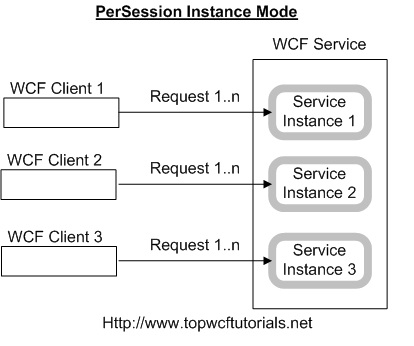
For PerSession Instance mode, a new instance is maintained on server for one session. For separate session, another instance is created that serves the request. Normally, we use this technique, when we need to maintain session between multiple requests.
Above diagram shows that for all requests from “WCF Client 1″ are served by “Service Instance 1″. Same is the case for client 2 and client 3 respectively. In this technique, the service instance is disposed off when one a particular client completes its all method calls to perform a specific functionality.

Key points about this approach are follows:
  • Approach is preferable when we need to maintain state.
  • Scalability is a concern but not the biggest concern.
Single
In case of Single/Singleton Instance mode, only one instance is created to serve all the requests coming from all clients.
In this technique, service instance is not disposed off and it stays on server to serve all incoming requests.
Key points about this approach are follows:
  • We want to share global data using service.
  • Scalability is not a concern at all.

4 simple steps to enable tracing in WCF 


 Tracing mechanism in Windows Communication Foundation is based on the classes that resides in System.Diagnostic namespace. Important classes are Trace, TraceSource and TraceListener. For better understanding we will follow step by step approach in this WCF Tutorial. Following are the steps to enable tracing in WCF:

Step 1. Configuring WCF to emit tracing information/Define Trace Source

We have the following options:
  • System.ServiceModel
  • System.ServiceModel.MessageLogging
  • System.ServiceModel.IdentityModel
  • System.ServiceModel.Activation
  • System.Runtime.Serialization
  • System.IO.Log
  • Cardspace
In configuration file, we will define a source to enable this configuration as follows:
      <source name=”System.ServiceModel.MessageLogging”> 

Step 2. Setting Tracing Level

We have the following available options, we need to set this tracing level to available options other than default “Off”:
  • Off
  • Critical
  • Error
  • Warning
  • Information
  • Verbose
  • ActivityTracing
  • All
In configuration file, we can choose above values for switchValue attribute as follows:
<source name=”System.ServiceModel.MessageLogging”
switchValue=”Information”>

Step 3. Configuring a trace listener

For configuring a trace listener, we will add following to config file.
           <listeners>
<add name=”messages”
type=”System.Diagnostics.XmlWriterTraceListener”
initializeData=”d:logsmessages.svclog” />
</listeners>

Step 4. Enabling message logging

<system.serviceModel>
<diagnostics>
<messageLogging
logEntireMessage=”true”
logMalformedMessages=”false”
logMessagesAtServiceLevel=”true”
logMessagesAtTransportLevel=”false”
maxMessagesToLog=”3000″
maxSizeOfMessageToLog=”2000″/>
</diagnostics>
</system.serviceModel>
logEntireMessage: By default, only the message header is logged but if we set it to true, entire message including message header as well as body will be logged.
logMalformedMessages: this option log messages those are rejected by WCF stack at any stage are known as malformed messages.
logMessagesAtServiceLevel: messages those are about to enter or leave user code.
logMessagesAtTransportLevel: messages those are about to encode or decode.
maxMessagesToLog: maximum quota for messages. Default value is 10000.
maxSizeOfMessageToLog: message size in bytes.
Putting all this together, configuration file will appear like this.
    <system.diagnostics>
    <sources>
      <source name=”System.ServiceModel.MessageLogging”>
        <listeners>
          <add name=”messagelistener”
               type=”System.Diagnostics.XmlWriterTraceListener” initializeData=”d:logsmyMessages.svclog”></add>
        </listeners>
      </source>
    </sources>
  </system.diagnostics>
    <system.serviceModel>
      <diagnostics>
        <messageLogging logEntireMessage=”true”
                        logMessagesAtServiceLevel=”false”
                        logMessagesAtTransportLevel=”false”
                        logMalformedMessages=”true”
                        maxMessagesToLog=”5000″
                        maxSizeOfMessageToLog=”2000″>
        </messageLogging>
      </diagnostics>
    </system.serviceModel>
Note: In this case, information will be buffered and not published to file automatically, So, we can set the autoflush property of the trace under sources as follows:
autoflush =”true” />

2014/05/23

How to create chart & graph in Asp.Net


-----------.aspx page-------------------------------------------

<div style="width: 900px;">
            <asp:Chart ID="chartDaywiseUtilization" runat="server" Width="900px" Height="250px" BorderlineWidth="2" Palette="None" PaletteCustomColors="192, 64, 0"
                BorderDashStyle="Solid"
                BackSecondaryColor="White" BackGradientStyle="TopBottom" BorderWidth="2px" BackColor="211, 223, 240"
                BorderColor="#1A3B69">
                <Titles>
                    <asp:Title ShadowOffset="0" Name="Items" Text="Day wise average utilization" Font="Microsoft Sans Serif, 10pt" />
                </Titles>
                <Legends>
                    <asp:Legend Alignment="Near" Docking="Right" IsTextAutoFit="False" Name="Default" LegendStyle="Column" />
                </Legends>
                <Series>
                    <asp:Series Name="Utilization" BorderColor="180, 26, 59, 105"></asp:Series>
                </Series>
                <ChartAreas>
                    <asp:ChartArea Name="ChartArea1">
                        <AxisY LineColor="64, 64, 64, 64">
                            <LabelStyle Font="Trebuchet MS, 8.25pt, style=Bold" />
                            <MajorGrid LineColor="64, 64, 64, 64" />
                        </AxisY>
                        <AxisX LineColor="64, 64, 64, 64">
                            <LabelStyle Font="Trebuchet MS, 8.25pt, style=Bold" />
                            <MajorGrid LineColor="64, 64, 64, 64" />
                        </AxisX>
                    </asp:ChartArea>
                </ChartAreas>
            </asp:Chart>

        </div>
----------------------------------------------------------------------------------------------------------------------------
.Cs Page
----------------------------------------------------------------------------
protected void BindCharts()
    {
      
        DataSet ds = new DataSet();
        string EmpID = "61331245";
        string Sdate = GetFirstDateOfWeek(DateTime.Now).ToString("MM/dd/yyyy");
        string Edate = GetLastDateOfWeek(DateTime.Now).ToString("MM/dd/yyyy");
        ds = GetReport(EmpID,0, Sdate,Edate);
        if (ds != null && ds.Tables.Count > 0)
        {
            if (ds.Tables[0].Rows.Count > 0)
            {
                string[] x = new string[ds.Tables[0].Rows.Count];
                double[] y = new double[ds.Tables[0].Rows.Count];

                for (int i = 0; i < ds.Tables[0].Rows.Count; i++)
                {
                    x[i] = ds.Tables[0].Rows[i][1].ToString();
                    y[i] = Convert.ToDouble(ds.Tables[0].Rows[i][0]);
                }
                chartDaywiseUtilization.Series[0].Points.DataBindXY(x, y);
                chartDaywiseUtilization.Series[0].ChartType = SeriesChartType.Line;
                chartDaywiseUtilization.ChartAreas["ChartArea1"].AxisX.MajorGrid.Enabled = false;

                //chartDaywiseUtilization.Series[1].Points.DataBindXY(x, y);
                //chartDaywiseUtilization.Series[1].ChartType = SeriesChartType.Column;
                chartDaywiseUtilization.ChartAreas["ChartArea1"].Area3DStyle.Enable3D = false;

                chartDaywiseUtilization.Legends[0].Enabled = true;

            }
        }
    }


-----------------------------------------For multiple Series------------------------------------------------------
 <div style="width: 900px; margin-bottom: 15px;">
            <asp:Chart ID="chartDeployable" runat="server" Width="900px" BorderlineWidth="0" Palette="None" PaletteCustomColors="DodgerBlue; IndianRed; LightGreen"
                BorderDashStyle="Solid"
                BackSecondaryColor="White" BackGradientStyle="TopBottom" BorderWidth="2px" BackColor="211, 223, 240"
                BorderColor="#1A3B69">
                <Titles>
                    <asp:Title ShadowOffset="0" Name="Items" Text="Availability of deployable resources" Font="Microsoft Sans Serif, 10pt" />
                </Titles>
                <Legends>
                    <asp:Legend Alignment="Near" Docking="Right" IsTextAutoFit="False" Name="Default" LegendStyle="Column" />
                </Legends>
                <Series>
                    <asp:Series Name="30% Deployable" IsVisibleInLegend="true" BorderColor="180, 26, 59, 105"></asp:Series>
                    <asp:Series Name="50% Deployable" IsVisibleInLegend="true" BorderColor="180, 26, 59, 105"></asp:Series>
                    <asp:Series Name="75% Deployable" IsVisibleInLegend="true" BorderColor="180, 26, 59, 105"></asp:Series>
                </Series>
                <ChartAreas>
                    <asp:ChartArea Name="ChartArea2">
                        <Area3DStyle Rotation="10" Perspective="10" Inclination="15" IsRightAngleAxes="False"
                            WallWidth="0" IsClustered="False"></Area3DStyle>
                        <AxisY LineColor="64, 64, 64, 64">
                            <LabelStyle Font="Trebuchet MS, 8.25pt, style=Bold" />
                            <MajorGrid LineColor="64, 64, 64, 64" />
                        </AxisY>
                        <AxisX LineColor="64, 64, 64, 64">
                            <LabelStyle Font="Trebuchet MS, 8.25pt, style=Bold" />
                            <MajorGrid LineColor="64, 64, 64, 64" />
                        </AxisX>
                    </asp:ChartArea>
                </ChartAreas>
            </asp:Chart>

        </div>
-------------------------------------------------------------------------------------------------------------
protected void BindDeployableCharts()
    {

        DataSet ds = new DataSet();
        string EmpID = "61331245";
        string Sdate = GetFirstDateOfWeek(DateTime.Now).ToString("MM/dd/yyyy");
        string Edate = GetLastDateOfWeek(DateTime.Now).ToString("MM/dd/yyyy");
        ds = GetReport(EmpID,1, Sdate, Edate);
        if (ds != null && ds.Tables.Count > 0)
        {
            if (ds.Tables[0].Rows.Count > 0)
            {
                string[] x = new string[ds.Tables[0].Rows.Count];
                double[] y = new double[ds.Tables[0].Rows.Count];

                string[] x1 = new string[ds.Tables[0].Rows.Count];
                double[] y1 = new double[ds.Tables[0].Rows.Count];

                string[] x2 = new string[ds.Tables[0].Rows.Count];
                double[] y2= new double[ds.Tables[0].Rows.Count];

                for (int i = 0; i < ds.Tables[0].Rows.Count; i++)
                {
                    x[i] = ds.Tables[0].Rows[i][0].ToString();
                    y[i] = Convert.ToDouble(ds.Tables[0].Rows[i][1]);
                }
                for (int i = 0; i < ds.Tables[0].Rows.Count; i++)
                {
                    x1[i] = ds.Tables[0].Rows[i][0].ToString();
                    y1[i] = Convert.ToDouble(ds.Tables[0].Rows[i][2]);
                }
                for (int i = 0; i < ds.Tables[0].Rows.Count; i++)
                {
                    x2[i] = ds.Tables[0].Rows[i][0].ToString();
                    y2[i] = Convert.ToDouble(ds.Tables[0].Rows[i][3]);
                }

                chartDeployable.Series[0].Points.DataBindXY(x, y);
                chartDeployable.Series[0].ChartType = SeriesChartType.Column;
                chartDeployable.Series[0].IsValueShownAsLabel = true;
                chartDeployable.ChartAreas["ChartArea2"].AxisX.MajorGrid.Enabled = false;

                chartDeployable.Series[1].Points.DataBindXY(x1, y1);
                chartDeployable.Series[1].ChartType = SeriesChartType.Column;
                chartDeployable.Series[1].IsValueShownAsLabel = true;
                chartDeployable.ChartAreas["ChartArea2"].Area3DStyle.Enable3D = false;

                chartDeployable.Series[2].Points.DataBindXY(x2, y2);
                chartDeployable.Series[2].ChartType = SeriesChartType.Column;
                chartDeployable.Series[2].IsValueShownAsLabel = true;
                chartDeployable.ChartAreas["ChartArea2"].Area3DStyle.Enable3D = false;

                chartDeployable.Legends[0].Enabled = true;

            }
        }
    }

 What is AI? Artificial Intelligence (AI) is the ability of machines or computer systems to perform tasks that normally require human intell...